
Stats and rules
Define the values your world remembers and the rules that turn them into consequences.
Start with a question the game must answer
A useful stat gives your world one fact it can remember and change. Before adding a stat, finish this sentence: “During play, I need to know…”
- “…which side this cell supports.” → cell Allegiance
- “…how many soldiers this entity commands.” → entity Men Under Command
- “…whether this landmark is secure or besieged.” → landmark Status
- “…how severe the game-wide crisis is.” → world stat
If the answer belongs only in a biography or world description and will never change, it probably does not need to be a stat.
Open the relevant section in the Game Stat Table, select Add stat column, and create the property there. Naming a stat creates a question the world can answer; it does not create the cell, entity, or landmark that carries the answer.
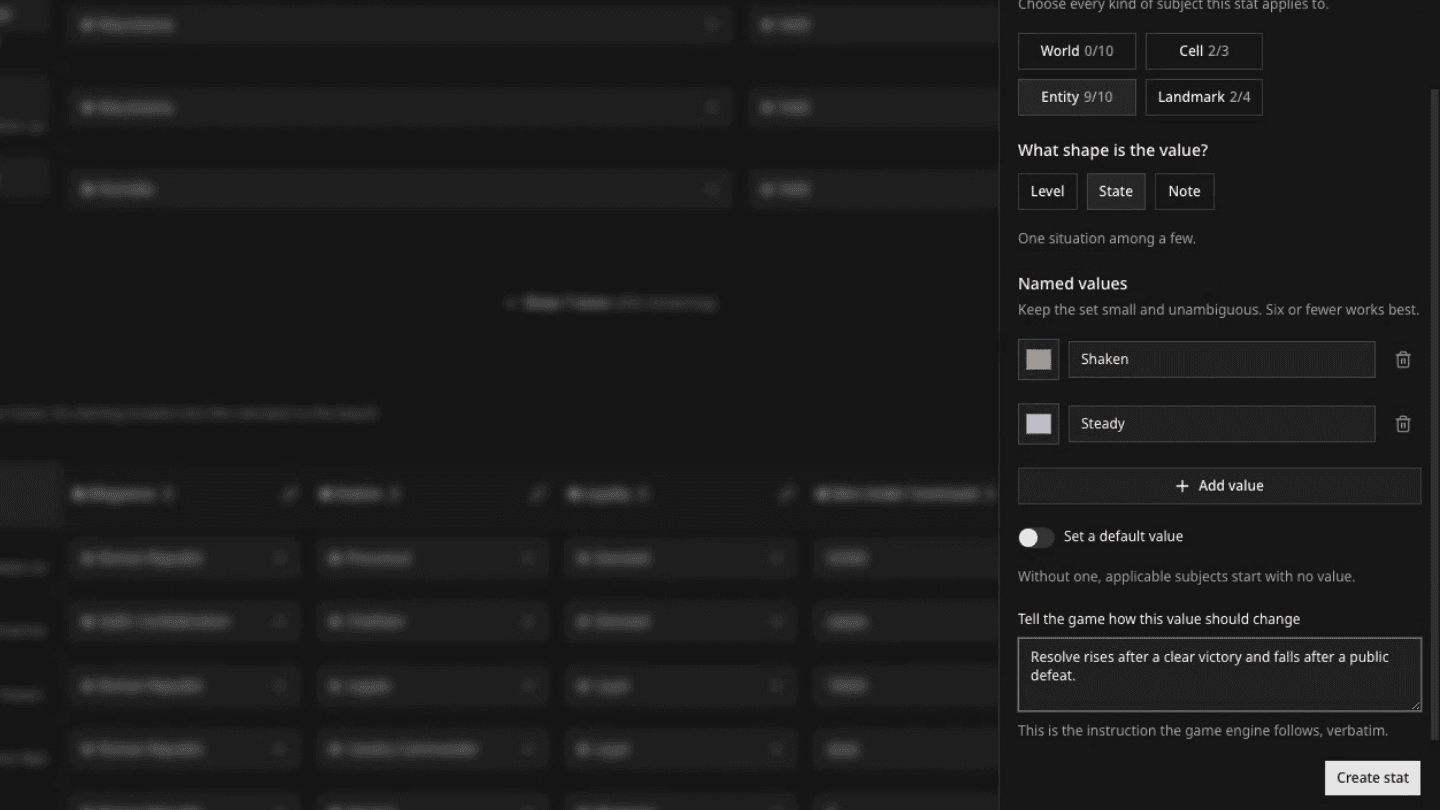
The clip adds one temporary Entity stat to the private Rome: Republic at War documentation draft. The entity already exists as a row; this new column gives it another property. The same editor is used for World, Cell, and Landmark stats.
Choose who carries the value
Under Who has this value?, select every option where the stat makes sense: World, Cell, Entity, and Landmark.
A stat can belong to one group or several. You can return to the editor and change this choice while you are working on a draft.
Allegiance can use the same named values and colors for a cell held by Rome, an entity serving Rome, and a landmark controlled by Rome. One stat then answers the same question across the map without creating three separate stats.
The counter shows how many stats you are using for each group. A stat that applies to Cell and Entity counts toward both limits, so keep only the stats that create meaningful choices or consequences.
Choose the shape of the value
The stat editor offers three shapes:
Give named values a visual language
State values and named Level steps each receive a suggested color. Keep it or choose another color that makes the value easy to recognize.
You see those same colors in the stat editor, the Game Stat Table, and map layers in the Creation Hub and during play. A clear palette helps everyone recognize a change before reading its label.
If you turn on Allow new values during play, the game can introduce a State value that was not in the starting list. Davia gives it a consistent color automatically. Named Level steps always stay within the steps you define.

Decide whether the stat needs a default
Turn on Set a default value only when one value describes the ordinary starting case for most cells, entities, or landmarks where the stat appears.
Leave it off when the stat should begin empty. Applicable rows start with No value until you give them one on the map or in the Game Stat Table.
Even when a default exists, you can choose No value for one particular row. This is useful when the stat belongs to that section in general but does not describe that cell, entity, or landmark.
In Rome: Republic at War, Allegiance begins with no default. The creator assigns a value only where a cell, entity, or landmark has a meaningful allegiance at the start of the game.
Explain how the value should change
Use Tell the game how this value should change to describe what the stat means and the situations that can change it.
Write causes and constraints, not a desired plot. For example, allegiance may change after conquest, revolt, diplomacy, or betrayal. It should not change merely because a nearby character wishes it.
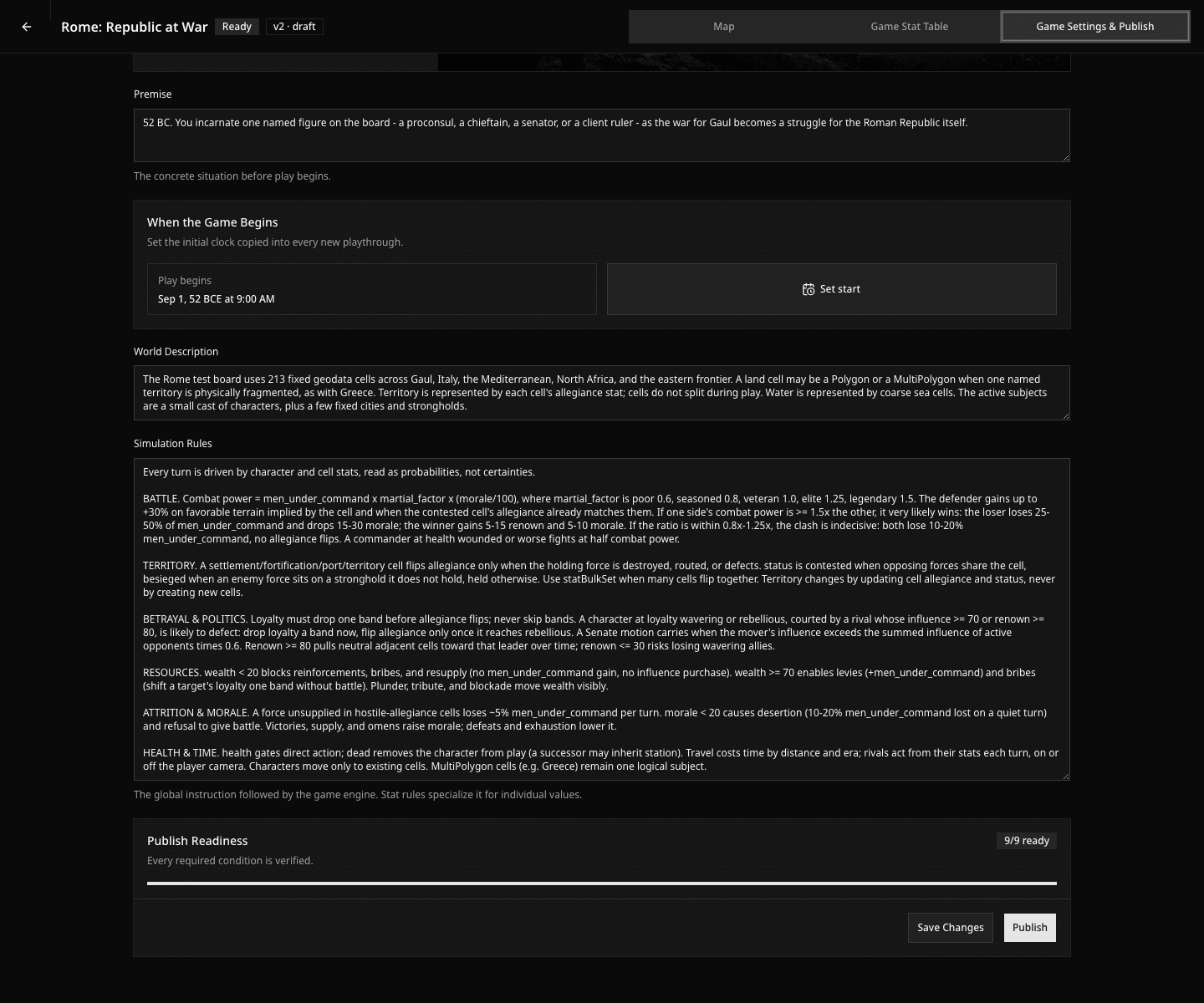
Use Simulation Rules to connect the world
Use Simulation Rules for systems that involve several parts of the world or several stats at once:
- battle power and losses;
- when territory can change hands;
- travel time and distance;
- political defection and loyalty;
- resources, reinforcement, and supply;
- injury, death, succession, and removal from play.
Resolve uncertainty without writing the plot
Prefer conditions that can produce many outcomes over rules that force one ending.
| Weak rule | Stronger rule |
|---|---|
| “Caesar conquers Gaul.” | “A cell changes allegiance only when the occupying force defeats, routes, or wins the defection of its holder.” |
| “The rebellion grows.” | “Low loyalty plus a rival with enough influence can trigger defection; nearby successes can raise or lower loyalty.” |
| “Travel is realistic.” | “Travel consumes time according to distance, terrain, and available transport.” |
Check the system before you move on
- Does every stat answer a question that matters during play?
- Have you selected every section where the stat should appear, and no others?
- Is the default truly the common case, or should the stat begin with No value?
- Can you understand every named value and color at a glance?
- Does each change instruction explain causes rather than demand an outcome?
- Do Simulation Rules cover the important interactions between stats?
- Can failure, delay, and unintended consequences still occur?